Tools (function-calling) for local models
https://ollama.com/blog/tool-support
the following screenshot is using local ollama (not some third party proxy bc that defeats the point of privacy and using local models)
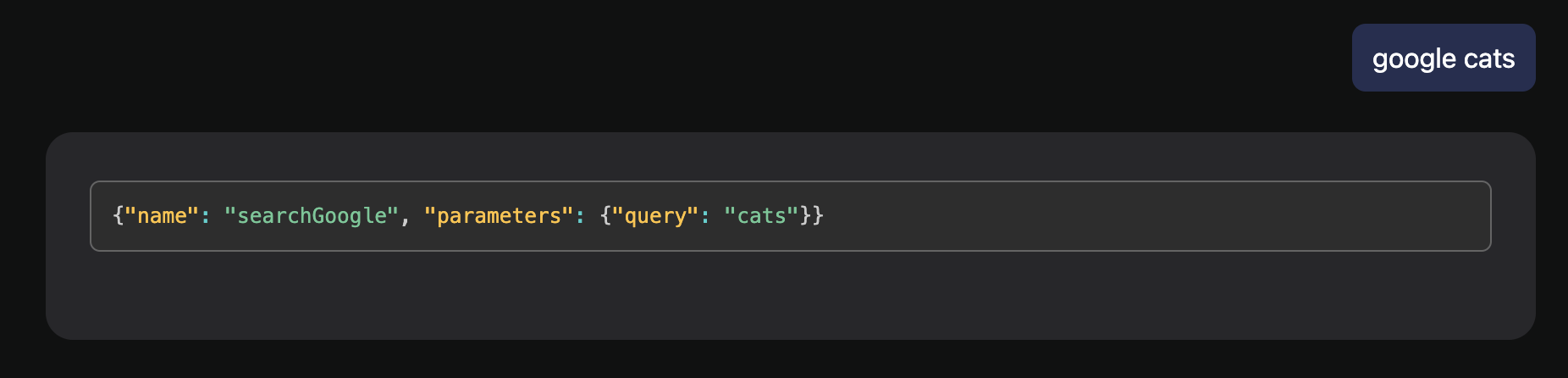
https://ollama.com/blog/tool-support
the following screenshot is using local ollama (not some third party proxy bc that defeats the point of privacy and using local models)
Log in to comment and vote
Comments10
Aug 2, 2024
Rose Pudding
May 24, 2025
This just got merged and ollama finially got openai compatible tool calling schema with streaming support!!
https://github.com/ollama/ollama/pull/10415 (not released now, need to compile from source)
just add it as a openai compatible endpoint and turn on streaming!
Teal Ox
May 25, 2025
Jourin Town omg u are saying this is still not easily available on local 💀
Rose Pudding
May 25, 2025
a Sadly yes, but the next version 0.7.2 should have everything working just like online providers, just like what I have shown above with proper streaming support.
Rose Pudding
Nov 7, 2024
I tried with this instruction
when you want to call a tool, please from now on use in this json format: { "tool": "toolname", "parameters": { "query": "something" }}it seems to be working fine-ish with command-r and mistrall-small, but you cannot have too many plugins activated at the same time, or it will easily go into infinite loops.
Rose Pudding
Nov 7, 2024
I tried changing Modelfile as following which works quite reliable with command-r, hope this can be a hint for others looking for an elegant solution.
FROM c4ai-command-r-08-2024-Q4_K_M.ggufTEMPLATE """{{- if or .Tools .System }}<|START_OF_TURN_TOKEN|><|SYSTEM_TOKEN|>{{- if .Tools }}# System Preamble## Basic RulesYou are a powerful conversational AI trained by Cohere to help people. You are augmented by a number of tools, and your job is to use and consume the output of these tools to best help the user. You will see a conversation history between yourself and a user, ending with an utterance from the user. You will then see a specific instruction instructing you what kind of response to generate. When you answer the user's requests, you cite your sources in your answers, according to those instructions.{{ if .System }}# User Preamble{{ .System }}{{- end }}## Available ToolsHere is a list of tools that you have available to you:{{- range .Tools }}{{- end }}{{- else if .System }}{{ .System }}{{- end }}<|END_OF_TURN_TOKEN|>{{- end }}{{- range .Messages }}{{- if eq .Role "system" }}{{- continue }}{{- end }}<|START_OF_TURN_TOKEN|>{{- if eq .Role "user" }}<|USER_TOKEN|>{{ .Content }}{{- if $.Tools }}<|START_OF_TURN_TOKEN|><|SYSTEM_TOKEN|>Write 'Action:' followed by a json-formatted list of actions that you want to perform in order to produce a good response to the user's last input. You can use any of the supplied tools any number of times, but you should aim to execute the minimum number of necessary actions for the input. You should use the `directly-answer` tool if calling the other tools is unnecessary. The list of actions you want to call should be formatted as a list of json objects, and don't wrap inside of a code environment, for example:{ { "tool": title of the tool in the specification, "parameters": a dict of parameters to input into the tool as they are defined in the specs, or {} if it takes no parameters }}{{- end }}{{- else if eq .Role "assistant" }}<|CHATBOT_TOKEN|>{{- if .Content }}{{ .Content }}{{- else if .ToolCalls }}Action:[{{- range .ToolCalls }} { "tool": "{{ .Function.Name }}", "parameters": {{ .Function.Arguments }} }{{- end }}]{{- end }}{{- else if eq .Role "tool" }}<|SYSTEM_TOKEN|><results>console_output: {{ .Content }}</results>{{- end }}<|END_OF_TURN_TOKEN|>{{- end }}<|END_OF_TURN_TOKEN|><|START_OF_TURN_TOKEN|><|CHATBOT_TOKEN|>"""Rose Pudding
Nov 7, 2024
I tried with setting system prompt as previously stated instruction also works
SYSTEM """when you want to call a tool, please from now on use in this json format: { "tool": "toolname", "parameters": { "query": "something" }}"""maybe if we can directly set system prompts for local llms in the app can be a temporary solution?
Tony Dinh, The core reason for not working out of box is that most local llms are trained with custom tool calling schemes instead of the openai way, so either
or
use langchain's interpreter (how Kotaemon and perplexica does)
adapt individually(how openweb ui does, but this requires too much work)