Filter Open Router models when Importing them
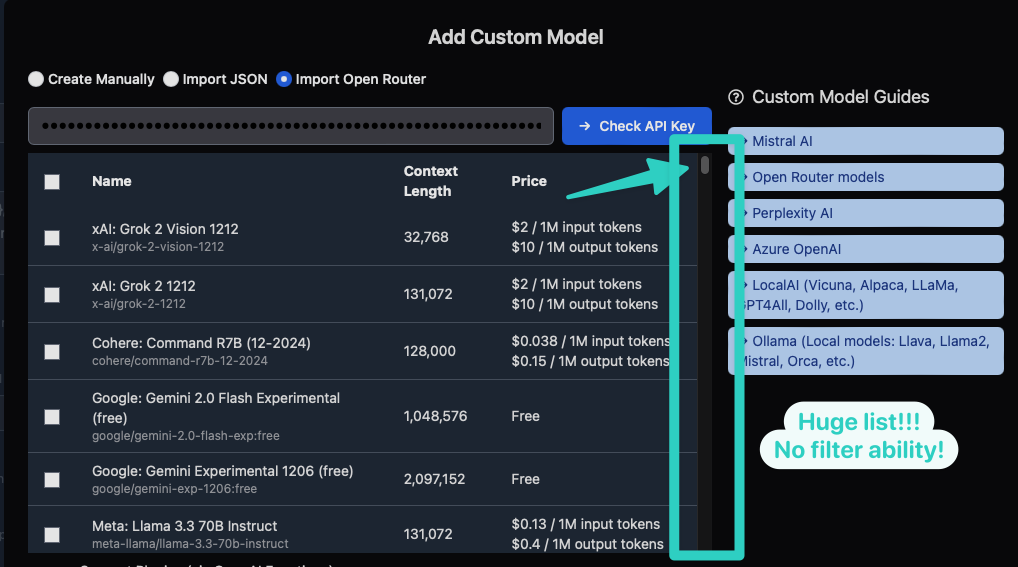
Under "Add Custom Model", when on the page to "Import Open Router", you are presented with a long table of all the Open Router models. However there are no search or filter functions so it can be very time consuming and difficult to find the specific model/s that you want to import.
A simple text field that lets you filter out the table would be very handy. Even as simple as just entering some text and it hides all models that don't include that string in their name/id/description fields would make it very easy to find the Open Router model that you are looking for.
Log in to comment and vote
Comments2
Ngoc Nguyen
Jul 9, 2025
you can now search OpenRouter models to quickly find the one you want to import:
https://x.com/TypingMindApp/status/1937790497000657162
Coffee Moss
May 28, 2025
Would love this feature!