Automatic Detection and Configuration of Model Capabilities When Importing from OpenRouter
Currently, when importing models from OpenRouter into TypingMind (“Add Custom Model” → “Import OpenRouter”), users are required to manually set the “Model Capabilities” switches (System Role, Streaming, Plugins, Image Input, etc). This manual process is extremely error-prone and leads to substantial usability issues:
If a capability is inadvertently set incorrectly, models can produce constant errors or do not function as expected in chat.
OpenRouter already exposes a comprehensive, machine-readable list of supported capabilities and model properties via its API endpoint: https://openrouter.ai/api/v1/models (see also https://openrouter.ai/openapi.json).
There is NO reasonable way to expect end-users to programmatically query the OpenRouter API, parse JSON, and map each capability manually to each TypingMind toggle.
Feature Request:
Please implement an automatic detection system in TypingMind:
When importing models from OpenRouter, TypingMind should fetch the actual model metadata from https://openrouter.ai/api/v1/models (and/or the OpenAPI spec).
The “Model Capabilities” switches in the import dialog should then be autoconfigured based on each model’s actual feature set, as published by OpenRouter (e.g., Streaming, Plugins/Tools, Image Input, System Role support, etc).
If capabilities are ambiguous or missing in OpenRouter’s response, TypingMind should display a clear warning, but still do its best to pre-select what is documented.
Manual override should remain possible for advanced users, but the default should always reflect the machine-readable truth from OpenRouter to minimize errors.
Why is this important?
TypingMind is otherwise not reliably usable with OpenRouter, as users must rely on guesswork or technical API analysis for every model import. This is a highly non-user-friendly experience and stands in contrast to TypingMind’s otherwise streamlined workflow.
References:
OpenRouter Model API: https://openrouter.ai/api/v1/models
TypingMind “Add Custom Model” → “Import OpenRouter” dialog
TypingMind “Model Capabilities” section
Official OpenRouter documentation: https://openrouter.ai/docs
TypingMind docs: https://docs.typingmind.com/chat-models-settings/use-openrouter-models
Thank you for considering this essential usability improvement!
The below screenshot demonstrates the core of the problem: When importing "Google: Gemini 3.1 Pro Preview", one of the most advanced models available, which is well-known to support nearly all modern features (system role, streaming, plugins/tools, image input, and more), almost all Model Capabilities toggles are disabled by default in TypingMind. Only "System Role" and "Streaming Output" are pre-selected. As a result, even though the underlying model can handle images, plugins, advanced reasoning, etc. these crucial capabilities remain unused and inaccessible unless the user manually enables each respective toggle.
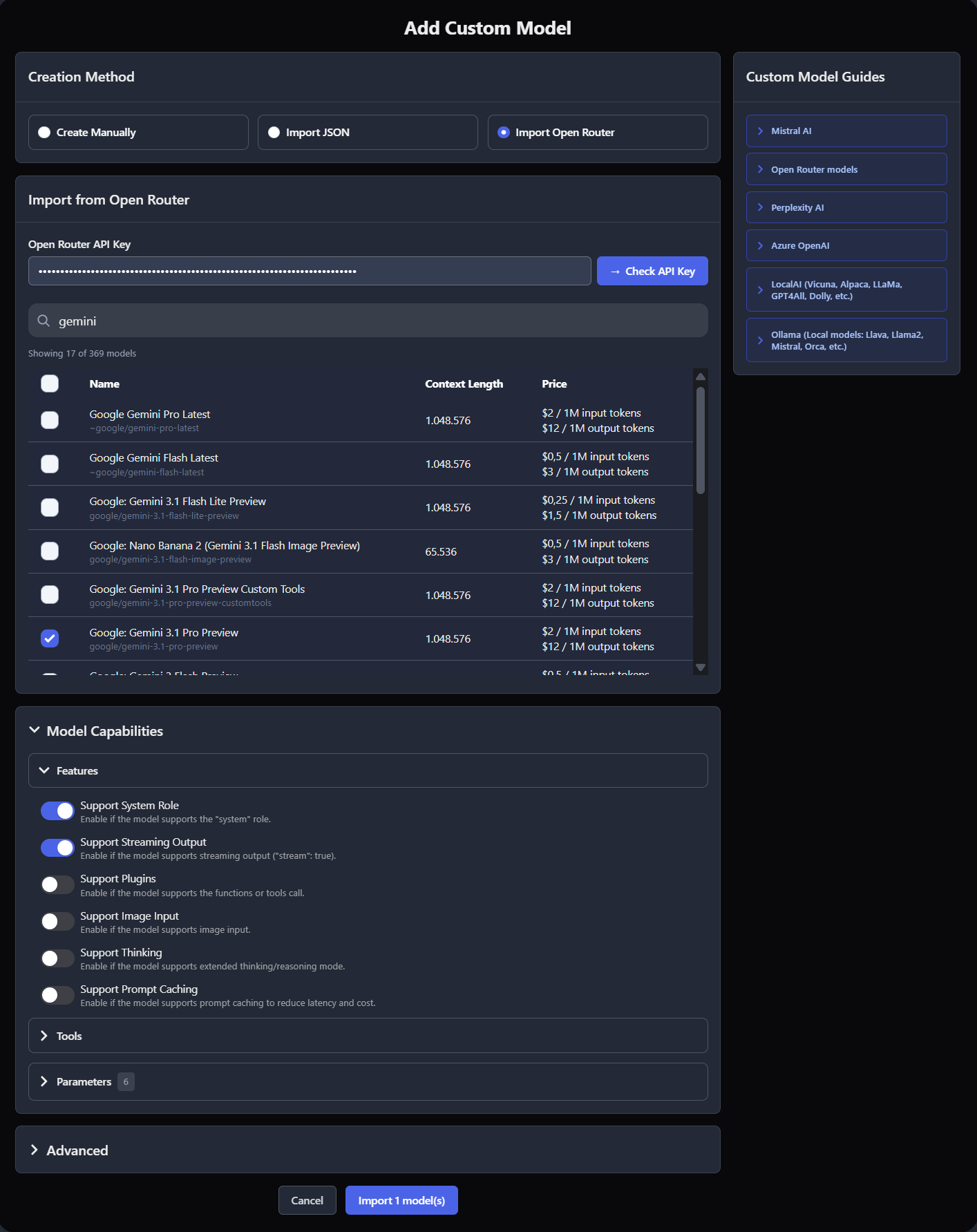
Manually enabling all toggles is not viable. Each model supports a different set of capabilities, and enabling unsupported features leads to constant errors. With multiple (or new) OpenRouter models, users cannot know all capabilities by heart and would need to check each model programmatically first. This is unmanageable and undermines the entire point of an integrated model import.
Log in to comment and vote
Comments7
May 13
PinnedWe’ve just added official support for OpenRouter!
You can now simply enable the OpenRouter models you want to use.
Learn more here:
https://feedback.typingmind.com/changelog/official-support-for-more-ai-providers
Gray Crater
May 14
Why is this set to "completed"? I don't believe any of this is completed. This feature request has nothing to do with the somewhat simplified import of OpenRouter that has recently been implemented.
Please reopen this feature request.
Ngoc Nguyen
May 21
Hi David,
We already added official support for OpenRouter, which means you no longer need to enable model capabilities manually via custom model configuration.
You can simply go to Models > OpenRouter and enable the models you want to chat with:
https://docs.typingmind.com/manage-and-connect-ai-models/openrouter
Could you please clarify what else you would like to set up or customize?
Moccasin Notebook
May 27
I think what is being requested is not completely completed … is my experience. In fact I specifically have issues with the Anthropic Claude models and their websearch.
Ngoc Nguyen
May 28
Hi, could you please share with us the issue you encountered with via support@typingmind.com so we can provide further support?
Gray Crater
Oct 2
I believe in the meantime this has been perfectly implemented. Awesome. Thanks to the entire team!
Emerald Sprout
May 4
Yes, please! Great idea and well-described issues. 👍
I would call myself an average or even experienced PC user. But to understand all these details and configurations is simply too hard for me. 😵💫
You could argue that then TypingMind is simply not for me.
#### But from my perspective, TypingMind is THE tool that is or could and should actually become capable of simplifying and, therefore, democratizing the whole AI toolchain and configuration process!!! ####
Please! Make it as simple as possible, especially for those who don’t yet know how much they might need TypingMind to make their AI tool usage easier. 💛